
Using the calculator
How do I calculate my birth chart?
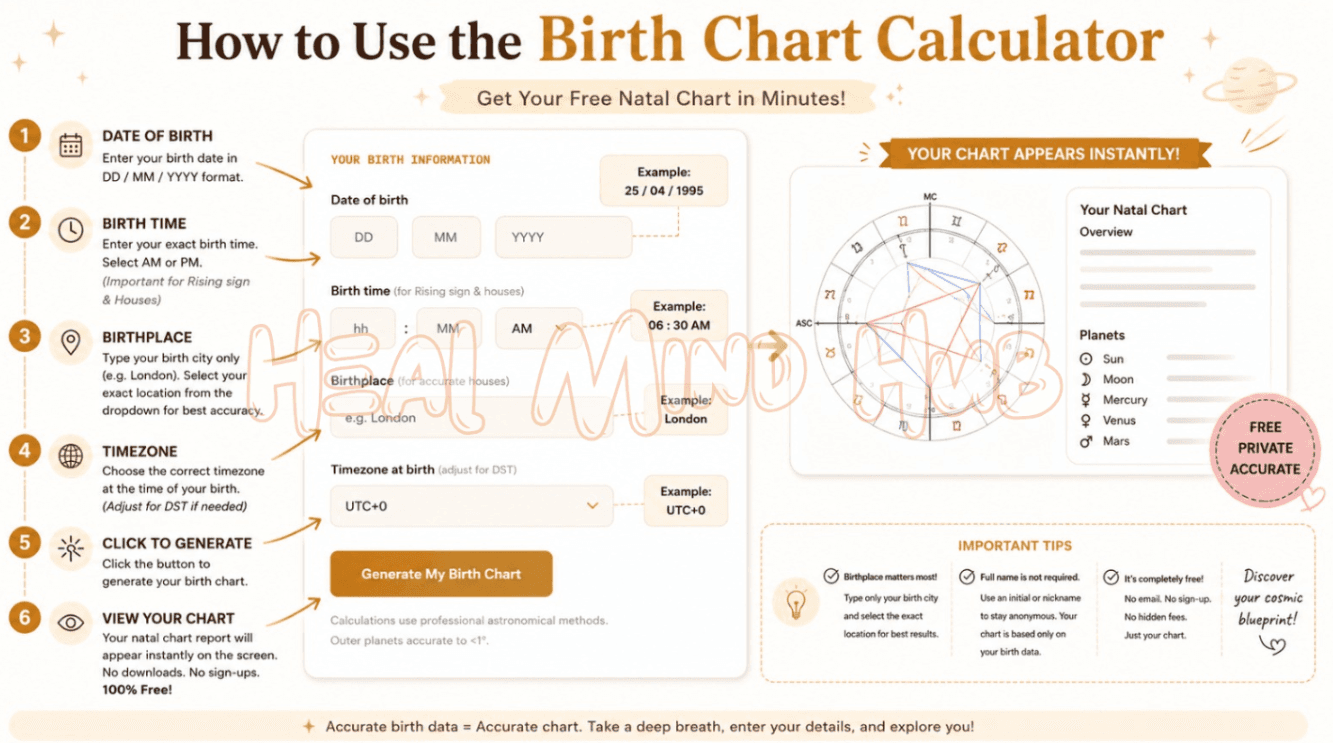
A birth chart is a snapshot of the sky at the exact moment and place you were born. The calculator needs three pieces of information to rebuild it, and each one unlocks a different layer of the reading.
- 1Enter your date of birth day, month and year. This alone places your Sun and every slow-moving planet by sign.
- 2Add your birth time as precisely as you can. Time is what fixes your Rising sign and the twelve house cusps — without it, those two layers cannot be calculated at all.
- 3Start typing your birth city and pick it from the list. Its coordinates set your local horizon, which the whole house system is built from.
- 4Press Calculate to get the full natal chart: all ten planets by sign and house, your Rising sign, the major aspects between them and an interactive chart wheel.
About birth charts
Understanding your birth chart
A birth chart—also called a natal chart—is a precise map of where every planet in our solar system was positioned at the exact moment you were born, as seen from your birthplace on Earth. Each planet occupies a zodiac sign, which colours its expression, and falls in one of 12 houses, which shows the life area it influences most.
Your chart is a snapshot frozen in time. The geometric angles between planets — called aspects — add another layer, describing how your inner drives cooperate or create tension with each other. Together these placements form a layered portrait of personality, potential and recurring life themes that is entirely unique to you.
Getting started
Tips for an Accurate Reading
When I make my charts, I've learned that the birthplace location field matters most, so for best results, type only your birth city there. Depending on your device, matching locations with that city name will either drop down automatically, or you might have to click the arrow to open the full list and select your exact birth location from that list.
Here's something most people don't realize: your full name isn't needed at all, since every interpretation in an astrology report comes from your birth data alone. To stay anonymous, I usually drop just an initial or a nickname into the Name field, which keeps the entry private without changing a thing.
The part I love is that these readings are completely free to create. After you make your selection and hit the OK button, your natal chart report shows up right on the screen, with no need to download it, no need to share your email, and no pushy sign-up wall in your way.
Your data
Saving and Managing Your Birth Data
Say your birthplace is Denver, Colorado—I always just type "Denver" into the field and let the list pop up so I can choose the correct Denver location. On a small screen, click or tap the arrow at the end of the first item to open the full list, and once your selection feels right, hit the OK button.
Here's how the birth chart calculator really helps: when entering birth data for a person or event, the site's database keeps your chart data saved under a profile number.
That convenience means you can create multiple reports from one birthdate without having to re-enter the data, and Relationship astrology reports simply need two sets of data that get compared.
The best part, from my own use, is the freedom you keep over every chart. Your birth details aren't tied to an email address, so a relationship reading or previous reports stay private in the database until you decide otherwise.
You can delete any single chart entry or entry from your saved birth chart list, or wipe your entire list/profile at any time — full access, on your terms.
Sharing
Sharing and Verifying Your Chart
When I want to share a reading with someone, I tick the Shareable option so the link/URL to my chart's report can be passed along. Once you copy that link, others can see and view the chart, and it becomes discoverable online.
If you'd rather keep things private, just leave the Shareable box unchecked, which is the default setting. You can always edit the chart later to make it shareable and viewable by others whenever you change your mind.
One habit I never skip is to double-check my details for accuracy before relying on a report. Sending an email with your full birth information lets you confirm the time zone offset is accurate, since time zone information can be tricky across astrology software programs—so when writing in, mention you want to check the time zones and birth data.
Time zones
When the "Time Zone Not Sure" Field Shows Up
In my experience, this field tends to surprise people: after selecting your location and clicking Submit, if the software refreshes the same screen and a new Time Zone Not Sure field appears under the time field, don't panic.
Some time zones in the database carry exceptions tied to ambiguous historical time zones, which the Historical Time Zone Issues guide explains well. You may need to adjust the numerical value here, but if the value is already correct, just hit Submit again to reach your report.
A classic example of these odd dates and locations happened in Illinois during the late forties and fifties, when an odd law affected recording CDT times as CST—so the field lets you choose -6 for CST or -5 for CDT.
The one rule I always stress: never alter the +/- of the entry, since the program converts local time to UT, not the reverse. If you're still uncertain, send an email to us with your full birth data and we'll help sort it out.
Birth time
Unknown Birth Times and Edge-of-Sign Placements
If you don't know your birth hour, checking off Time Unknown tells the program to leave out the Ascendant and house positions from the report, since these can't be determined with any accuracy without a birth time.
For most users, there's nothing extra to do — the report is simply produced without the time-sensitive data, and that's perfectly fine for studying the rest of the chart service.
One detail I always tell people to watch: if a body sits at 0 degrees and 0 minutes of a sign, the program may have rounded up, meaning it could actually be 29 degrees and 59.5 (or greater) of the previous sign and technically belong there. When that happens, write to us with your birth data for confirmation. If you have other questions, the Free Reports FAQ is a great start.
Without a birth time
Finding the Range of Positions Without a Birth Time
When someone doesn't have an exact time, I tell them the birth time field still does plenty of work, since it's what the calculator uses to calculate the planets' positions for the Sun, Moon, and other planets. If you want a solid middle ground reading for a particular day, enter noon—that gives you the best average for the day without overthinking it.
To explore the full possible range of signs and degrees, here's a trick I lean on: note the positions at 00:01 and again at 23:59, and that span shows you the whole range. The Moon often lands in one of two signs because it changes signs roughly every 2-1/2 days, while the Sun and slower planets may sit on a cusp.
Still, you can check this way, but remember that without a birth time you can't pin down the precise positions with real certainty.
Storage
How Your Chart Data Is Stored and Retrieved
From what I've seen trip people up most, it's worth knowing that your chart data is saved in a cookie inside your browser, purely for convenience.
If you clear the cache, the data stored there gets erased, which is why I always jot down the profile number and PIN sitting just below my list of saved charts—with those numbers, you can log in to a profile and retrieve everything, even when retrieving stored data on other devices. Just keep in mind we can't promise the data stays perpetually.
One small habit I'd recommend for privacy: keep things anonymous by popping an initial or a pet name into the name field. It costs you nothing and keeps your details quietly your own.
Disclaimer
Beyond Your Birth Chart
Your birth chart is the most complete map of yourself astrology can offer – your sun, moon, rising, and every planet, all in one picture. But a map only shows you the terrain; it cannot walk the path for you. Understanding who you are is powerful, yet turning that insight into real, lasting change is a different journey altogether.
That is exactly where Dr. Dan Amzallag comes in. As a professional life coach, he helps people take everything they have learned about themselves and turn it into genuine momentum — setting clear goals, working through what quietly holds them back, and building a life that finally feels aligned with who they truly are.
If exploring your chart left you thinking "I want to actually act on this," a coaching session is where that self-awareness becomes real progress. Book a free 15-min session with Dr. Dan
Disclaimer: Dr. Dan is a licensed coach and therapist, not an astrologer. His coaching and therapy are separate professional services.
What people say
Be one of the first to rate this tool — your feedback helps others decide.
More free astrology tools
Explore related tools
Frequently asked questions
Astrology guides
Related Articles
 ⭐ Birth Charts
Lilith in the 12 Signs: Your Hidden Power Revealed
Discover what Lilith in your sign reveals — your hidden desires, deepest wounds, and untamed power. Explore all 12 Lilith signs and reclaim your shadow self.
 ⭐ Birth Charts
Rising Sign (Ascendant): All 12 Signs Explained
Discover your rising sign (Ascendant) — what all 12 signs reveal about your personality, appearance, and ideal partner. The complete guide to your Ascendant.
 ⭐ Birth Charts
What Your Birth Chart Reveals About Your Relationship Style.
Your natal chart holds deep clues about how you love, what you need in a partner, and where relationship challenges arise. Here is what to look for.